The release tracker, in your toolbar
The MMOlist browser extension puts the release calendar one click away: upcoming MMO launches, betas, fresh servers and shutdowns — sourced dates, delay history, and countdowns that never pretend a window is a date.
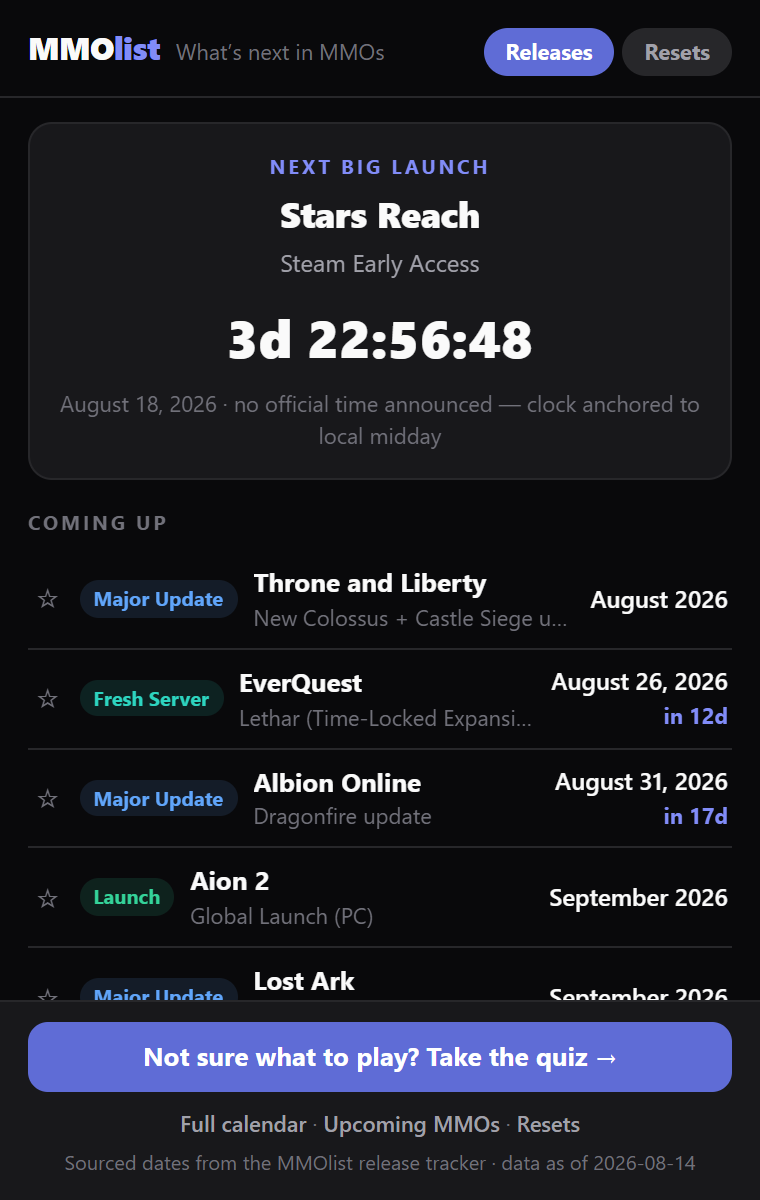
The next big launch, counting down
A live clock for the soonest confirmed launch — and when only a window like “Q4 2026” exists, you see the window, never a fake countdown.
A countdown on the icon itself
The toolbar badge shows days remaining once a confirmed launch is inside 30 days — glanceable without a single click, and it never counts toward an unconfirmed window.
Everything coming up
Launches, betas, expansions, fresh-server openings and announced shutdowns from the release tracker, each linking to its game page.
Daily & weekly reset clocks
A Resets tab with sourced reset schedules — each countdown derived from its published anchor clock, shown alongside it.
Pin your games
Star the games you care about and their events and resets float to the top. Pins ride your own Chrome profile's sync — no account, and never our servers.
Your ★ games as a live calendar
One click subscribes your pinned games' sourced dates into Google, Apple, or Outlook — a slipped date corrects itself in your calendar instead of going stale.
Delays, disclosed
Events that slipped carry a Delayed badge, and TBA entries show when we last re-checked the sources — the same honesty rules as the site.
Same data, same rules
The popup reads the exact release tracker behind /calendar and /upcoming: every date is backed by a cited source, a live clock appears only for confirmed exact days, estimated times are labelled as estimates, and a date with no announced hour says so instead of counting to midnight. If the tracker doesn’t know, the extension says TBA — and shows when we last checked. The Resets tab reads the same sourced schedules as /resets, always showing the published anchor clock next to any countdown derived from it.
Privacy
The extension collects nothing. No analytics, no identifiers, no browsing data, no account. It requests exactly two browser permissions, both in Chrome’s lowest-trust tier (installing shows no permission warnings, and neither grants any access to your data or browsing): alarms, so the toolbar badge can re-check the countdown and flip “4d” to “3d” at midnight, and storage, which caches the public release-tracker JSON for offline use and holds your pinned-games list (synced between your browsers by your own Chrome profile — Chrome’s sync, never our servers). Calendar buttons link to the site’s public .ics feed; subscribing happens entirely in your calendar app. Its only network request is fetching that same public JSON this site serves. Links you click open mmo-list.com with a utm_source=chrome_extension tag so we can see aggregate visit counts (standard, anonymous referral tagging — nothing about you). This section is the extension’s privacy policy.
Prefer no install? The same data lives on the calendar, the .ics feed, and the weekly digest.